





Earn a 20% comission everytime someone buys a product through your affilliate link:
Here is a step by step guide to set up your account and start earning. Please Read Step 1 to Step 7 to fully set up your account:
Step 1 Register as an affiliate:
Visit the Following Link to Register (Make sure that you save your password and username somewhere safe):
https://swiftbasket.co.za/affiliate-area/?affiliates-dashboard-section=registration
Step 2 Submit your PayPal or Banking details to receive payments:
After Registering, Visit the following link to submit your banking details https://forms.gle/rSaSnsxitcTjsZjj8
Step 3 Login:
After Registering as an affiliate and submitting your banking details for payments, Visit the following link to login:
https://swiftbasket.co.za/affiliate-area/?affiliates-dashboard-section=login
Step 4 Get your Unique Affiliate Link:
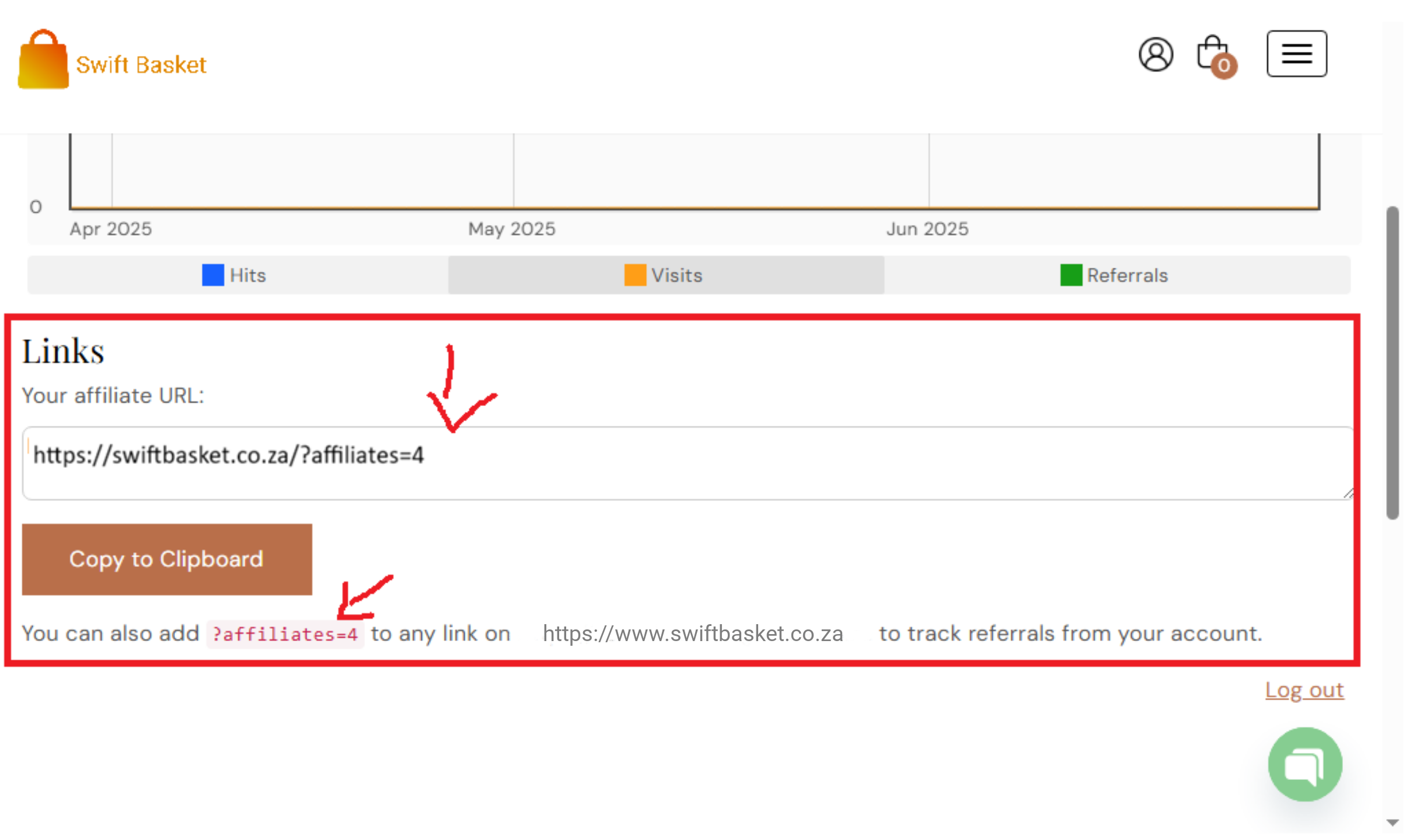
After logging in, you will be redirected to the Affilliate Area (Your Dashboard).
Simply Scroll Down and you will see your affiliate link/Url (as illustrated in the image below)
Step 5 How to use your unique affiliate link/Url to get maximum results:
Part 1: How to share the website with your affiliate link:
To share the website with your affiliate link, simply create content and talk about the Swift Basket website and how people can buy products from the website. Then add the link in the description. The link will look something like this https://swiftbasket.co.za/?affiliates=8 (remember the number 8 will be different for you so copy the link you will get from the Affiliate Area/Dashboard)
Part 2: How to share links to a single product/perfume
If you would like to share the link to a single product, simply go to https://swiftbasket.co.za , navigate to the product you would like to share, then copy the link of that product and add your unique affiliate link/Url at the end of the link.
For Example:
if you would like to share the Perfume Dolores Pour Femme 100ml EDP with your audience. Simply navigate to the link and copy the perfume’s link, then add your unique affiliate link/Url.
In this case for the Dolores Pour Femme 100ml EDP, the link will be https://swiftbasket.co.za/product/dolores-pour-femme-100ml-edp/.
all you have to do is add your unique affiliate identifier at the end of the link, so it looks like this
https://swiftbasket.co.za/product/dolores-pour-femme-100ml-edp/?affiliates=8
Step 6 Sharing your link so you can start earning:
Once you have your affiliate links in place, you can do the following (depending on the platform)
Instagram :
Add the link to your bio, then talk about the products and the Brand Swift Basket on your stories, feed or posts. Always tell your audience to click on the link in bio so they can order theirs. (you can also add the link to your Instagram stories if necessary)
Youtube :
Create Videos or Shorts, and talk about Swift Basket or any of its Products, then add the link in the description and let your fans know that they can order their perfumes by clicking on the link in the description.
TikTok:
Add the link to your bio, then talk about the Products or The Brand Swift Basket then tell your audience to click on the link in bio to order theirs. (remember, you can change the link in bio, depending on the product you are talking about)
Twitter/X:
Write Posts about the Products or the brand “Swift Basket”, and include your affiliate link, so people can buy through your link
Facebook:
Write Posts about the Producte or brand “Swift Basket”, and include your affiliate link, so people can buy through your link
Create Videos or Shorts, and talk about Swift Basket or any of its Products, then add the link in the description and let your fans know that they can order their perfumes by clicking on the link in the description.(you can also add the link to your Facebook stories if necessary)
Bloggers:
Write Articles about the Swift Basket brand and its products, then share your affiliate link so your audience can purchase through your link.
Step 7 Viewing your earnings and Payments:
To View your Earnings, Simply login to your Affiliate Area (using the following link: https://swiftbasket.co.za/affiliate-area/?affiliates-dashboard-section=login) and Click on the Earnings Section, to see how much you have made.
Payments are made weekly (Every Monday).
You can find some Swift Basket Marketing Material Here, visit the link and start sharing and earning!: